

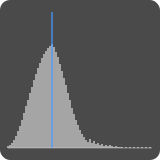
Pitch Detector
The Pitch Detector control displays the frequency content of the current audio input and sends the detected pitch via OSC. Press and hold the Pitch Detector to change the display mode from logarithmic to linear or vice-versa.
Settings
| Setting | Description |
|---|---|
| X Axis | Sets whether the X axis represents frequency on a logarithmic or linear scale. |
| Polling Interval | Determines how often the pitch detector analyzes the incoming audio signal and updates the detected pitch value. Shorter intervals provide more frequent updates. |
Variables
The following variables can be used when configuring outputs for this control:
| Variable | Description |
|---|---|
| Frequency | The detected frequency in Hz |
| Confidence | Confidence that the frequency is correct |
OSC Messages
This control responds to the following OSC messages:
| Message | Description |
|---|---|
<address> position <x> <y> <width> <height> | Sets the control's position. Coordinates are specified in pixels. |
<address> color <blue|red|green|orange|purple|brown|gray> | Sets the control's color. |
<address> xAxisType <linear|logarithmic> | Sets the x-axis scale |